What is Goals Planning?
Goals Planning cuts through the noise of modern productivity apps. Where most habit trackers overwhelm with features, Goals Planning focuses ruthlessly on a single view — the monthly progress matrix — making it immediately clear what you accomplished and what needs attention.
The Monthly Matrix
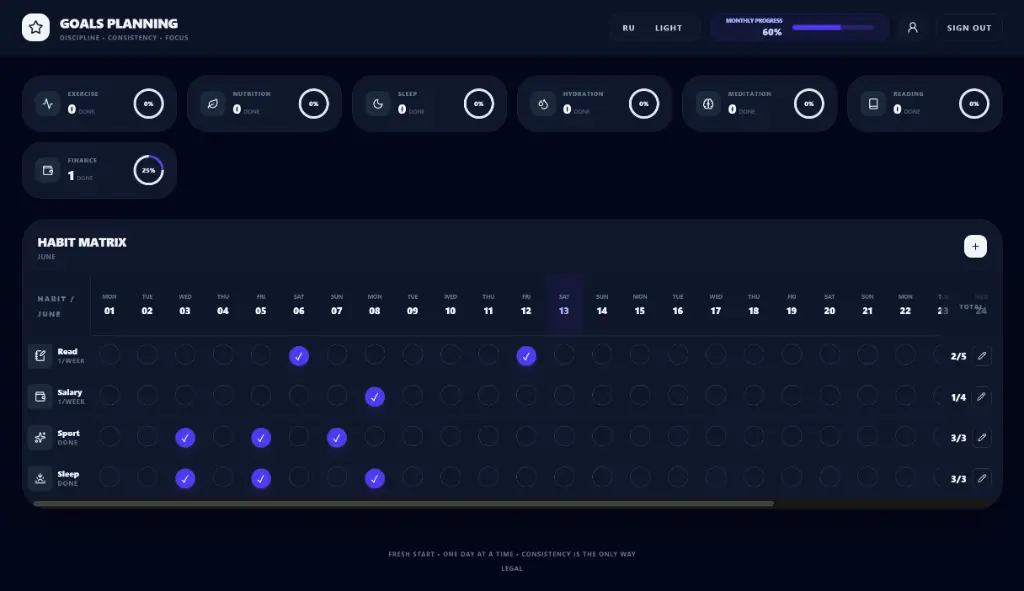
The core interface presents a calendar grid with days as columns and habits as rows. Each cell contains a simple toggle — did you complete this habit today or not? No complex logging, no multi-step workflows, just tap and move on.
The sticky axes ensure the matrix remains readable as habits accumulate. Habit names stay visible on the left while dates remain visible at the top. The fast state toggling lets users update multiple habits in seconds, making daily check-ins feel effortless rather than like another task on the todo list.
Flexible Goal Structure
Unlike rigid habit trackers that demand daily completion, Goals Planning accommodates any cadence. Want to exercise 3 times per week? Set that as the goal. Prefer reading 15 minutes daily? That works too. The system calculates pace — if you're behind, you see how many sessions remain to stay on track; if ahead, you see your buffer.
The goal configuration accepts any number of repeats per month, making the system adaptable to everything from daily meditation to quarterly reviews.
Speed-First UX
Every interaction in Goals Planning prioritizes speed. Adding a new habit takes under 5 seconds. Editing existing habits takes under 3 seconds. Removing completed habits takes under 2 seconds. The interface removes all friction between intention and action.
Quick-add mode enables rapid habit entry with minimal typing. Bulk operations let users update multiple habits simultaneously. Keyboard shortcuts enable power users to navigate entirely by keyboard.
Monthly Statistics
At month end, the platform generates clear statistics: total completions, completion rate, longest streak, current streak, and comparison to previous months. The comparison view highlights improvement areas and celebrates wins.
The stats presentation emphasizes progress over perfection. Missing a day doesn't trigger guilt — it triggers analysis. What conditions contributed to success? What obstacles appeared during struggles? The platform helps users understand their patterns rather than judging them.
Language and Theme
The UI supports Russian and English with smooth switching. Dark mode provides a low-light option for evening sessions, reducing eye strain while maintaining clarity. The minimal aesthetic avoids visual noise, keeping attention on what matters — the habits themselves.
SvelteKit Implementation
Goals Planning runs on the webs platform as a tenant application, sharing database infrastructure while maintaining a distinct visual identity. The minimal, progress-focused design reflects the product philosophy — no clutter, no distractions, just clarity on what matters.
Implementation Details
The monthly matrix implementation prioritizes data integrity. Each toggle state change triggers immediate database persistence, preventing data loss from unexpected browser closures. Offline support via service workers queues changes when connectivity drops, synchronizing when connection restores.
The pace calculation algorithm handles variable-length months correctly. February receives the same 28-29 day consideration as any other month. Leap year handling ensures February 29 users receive appropriate goal scaling.
Performance Considerations
Matrix rendering uses virtual scrolling for users with more than 20 habits. Only visible rows render at full fidelity, with placeholder rows maintaining grid structure. This approach supports users tracking 50+ habits without performance degradation.
Database queries optimize for monthly range retrieval rather than full history loads. Each month fetches only that month's entries, with historical data lazy-loading on demand. This architecture supports long-term usage without the performance penalties typical of cumulative tracking apps.